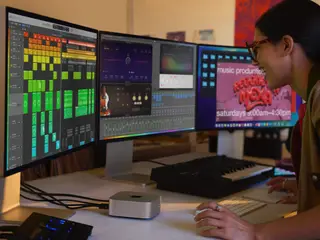
Arguably the best system for music production and professional audio work, Apple Macs and macOS are a strong choice for your studio, but some models carry an intimidating price tag. The shift to Apple Silicon in the last half-decade has seen huge gains in performance across all Macs, but finding the right model for you, whether a lightweight MacBook Neo or the fully spec’d Mac Studio, will depend on a few important factors. We’re here to help you choose the right Mac for your music project. READ MORE: Which operating system is best for music-making in 2026? Every Mac purchased directly from Apple comes with a bunch of customisable components. However, unlike in the past, features such as RAM and hard drives can no longer be upgraded after the fact. It’s incredibly frustrating, yes, but also means it’s essential that you understand the most useful features before you buy. Also, remember that many of Apple’s most expensive CPU upgrades focus on boosting graphics performance, which is less crucial for audio work. RAM, meanwhile, is a major factor in DAW and plugin performance. You can also choose to include Logic Pro in your purchase from the Apple Store, but if you’d prefer a different DAW, there are plenty to choose from once you’ve set your Mac up. Apple’s Mac machines all carry M-series processors — now from M4 up to M5 Max. It breaks down broadly like this: an M chip is in the more affordable Macs, while Pro and Max chips are built into the more professional models, while Ultra chips are exclusive to the top-end Mac Studio, which has replaced the now-discontinued Mac Pro as Apple’s flagship workstation. The higher-spec chips have more processing and graphics cores, support more RAM, and can drive more external displays – but also cost more, of course. Here, we’ll guide you through which Mac is best for your style of work, and when you might want to upgrade its components to get the most out of your budget. Best overall: MacBook Pro Credit: Apple A true portable powerhouse, Apple Silicon has transformed the MacBook Pro into a supremely capable workstation with an immensely respectable battery life. The 14-inch model with an M5 chip is the most affordable option, but an M5 Pro or Max will give you more muscle for running larger DAW sessions, while the 16-inch model also adds valuable screen space. There are Thunderbolt 5 ports, which are compatible with USB-C, so connecting fast drives and interfaces is a breeze. These laptops can run serious pro audio and video projects with a ton of plugins. Apple will charge you a lot to boost the specs, but it’s well worth aiming for more RAM if you’re a professional and buying a future-proof computer to last you a long time. This adds up to £400 to the overall price, but is a better investment than increasing the SSD storage drive when you can connect an affordable external SSD — there’s no external RAM you can add to a MacBook. Any new MacBook Pro will be an excellent production workstation, with the M5 Pro hitting a sweet spot for price vs performance. Pros and cons + High-end desktop power in a laptop + Impressive battery life under load + Gorgeous Liquid Retina XDR displays + Solid selection of physical ports – Upgrades get pricey very fast – Expensive machines, even as Macs go Best budget Mac for music production: MacBook Neo Credit: Apple Apple surprised everyone with the MacBook Neo this year, at almost half the price of the next most affordable Mac, the MacBook Air. There are compromises involved in hitting that price point, but it’s still the cheapest a new Mac laptop has ever been in real terms. Powered by the same A18 Pro chip found in the iPhone 16 Pro, it has the same 8GB of RAM as the phone — it sounds crazy, but it’s surprisingly capable. However, you’ll notice a strain when running heavy projects. Note that the only upgrade option is to boost the 256GB SSD to 512GB for an extra £100, with no option to increase RAM. There’s a USB-C port offering speeds of up to 10Gbps, one at 480Mb/s for connecting peripherals, and it can drive a single 4K external monitor. With real-world performance similar to base-level M1 MacBooks, it runs Logic Pro and similar apps surprisingly well for less intensive tasks, though you’re not going to experience the snappy performance of a higher-end Mac. If your needs are moderate — perhaps a hobbyist, student, or someone looking for an all-round budget laptop — it’s an affordable and effective way to get into Apple’s ecosystem. Pros and cons + Most affordable new portable Mac ever + Runs full MacOS, connect peripherals + Solid performance with audio software – 8GB RAM is limiting for some producers – Slow USB compared to other Macs – No real upgrade options Best for professional music producers: Mac Studio Image: Simon Vinall for MusicTech Now officially the flagship Apple workstation since the demise of the Mac Pro, the Studio is the machine to get to sit at the heart of any professional studio setup. It has the highest physical
IndustryHouseBreaks
Which Apple Mac computer should you buy for music production?
·
Summary of the article
From the budget MacBook Neo to the flagship Mac Studio, here's which Mac suits your studio and your budget. The post Which Apple Mac computer should you buy for music production? appeared first on MusicTech.
Read the full article for more details on EDM Dance Directory News.
Share this article:
From the budget MacBook Neo to the flagship Mac Studio, here's which Mac suits your studio and your budget. The post Which Apple Mac computer should you buy for...
Written and reviewed by our team. Technology may support research, but final content is human-authored.