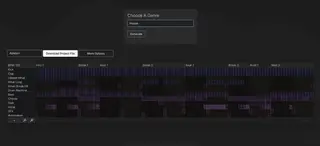
Despite the many genres today, especially modern production-focused ones like hip-hop, dance music, lo-fi, and trance, which tend to follow fairly predictable song arrangements, these arrangements still slow many producers down and can pull them out of a creative flow. JukeBlocks seeks to solve that. Dance music, in particular, often relies on a formulaic structure to stay functional for DJs and the dance floor, but even with that framework in place, arrangement remains one of the biggest sticking points in the production process. A lot of producers are great at building an eight- or 16-bar loop and stacking relevant synths, instruments, and other elements, but when it comes time to map that idea into a full arrangement, that is often where things start to fall apart. Sections do not land where they should, parts drag on too long, details get overlooked, and the whole process can turn into a headache. Jukeblocks.io is a site that aims to demystify that process, if not remove much of the friction entirely, by automatically generating arrangement templates. It offers templates across a number of genres, which help create a blueprint or roadmap that makes arranging a track much easier. We spent some time digging into how it works and what is going on under the hood, and in this review, we are going to look at what the platform actually offers and see if it solves the problems it claims to address. How Jukeblocks Works The basics of Jukeblocks are very simple. Once you log into your account, you are greeted by a clean, straightforward user interface. You choose a genre, hit generate, and the app creates a stock template for a wide range of arrangements. You can hit generate again at any point, and it will give you a fresh arrangement. It really is that simple. The platform covers house, lo-fi, and plenty of the popular genres producers are working in right now. One thing I liked is that if you are not happy with the first result, you can regenerate it and get a new option right away. If you want to go a little deeper, you can open the options menu, which gives you access to an extra set of features and controls. From there, you download the pack and bring it into your setup. Jukeblocks supports all the major DAWs, which helps a lot. If you use Logic, Ableton, or another common DAW, you can download the template version that fits your workflow and import it into your DAW of choice without much friction. Another useful feature is that you can enter your own instrument lanes as well. In the screenshot, you can see that I added a harp and a rough vocal take to start mapping out where extra custom instruments could sit in the arrangement. I do wish there were a way to rework the current arrangement after adding your own layers, so the platform could fold those new parts into the next version it generates. That feels like a minor limitation, though, not a dealbreaker. Along those same lines, it would also be helpful to customize genre templates with a few recurring elements that reflect your own style. I use a lot of arpeggiators and make a lot of melodic house, so having the option to include dedicated lanes for an arpeggiator or a counter-melody in the default house setup would be useful. Still, the main value of this platform, at least to me, is helping producers get past the initial arrangement block. It takes a basic eight-bar loop or a small group of layers you already have in place and gives you a working skeleton that you can shape into a full arrangement quickly, then refine later on your own. That is where the platform feels most effective, and it does not need to be highly detailed to still be genuinely useful. The Rearrange Tool One feature that deserves nearly as much credit as the core functionality of JukelBocks is the Rearrange function at the top, where you can upload your DAW projects and have them rearranged for you. You can take a six-bar loop or a 16-bar loop you have been working on, drop it into the rearranger, and it will turn the whole thing into a fresh project. There is a lot of potential there. I could also see a few roadblocks coming up, and that was one of the main things on my mind going into this test. .In the ALS file shown above, you can see the original project file. It is an idea I had been working on, layering slice samples, sketches, and other samples over a few chord progressions while I was mucking around in the studio the other night. I was curious to see how that would fit into a Rearrange template. Jukeblox automatically downloads the new project file as an Ableton Live set, so the next step was to open it up and see what it looked like. The Result? The results were pretty much what I expected overall. What surprised me was that it actually found the samples and re-exported them into a new Live set. I was half expecting it to pull the file names without being able to relink the actual audio, so that was a nice surprise and one part of the feature I genuinely liked. The main
IndustryHouseTrance
JukeBlocks Review: The Free Tool That Helps Producers Build Full Arrangements Very Fast
·
Summary of the article
Despite the many genres today, especially modern production-focused ones like hip-hop, dance music, lo-fi, and trance, which tend to follow fairly predictable song arrangements, these arrangements still slow many producers down and can pull them out of a creative flow. JukeBlocks seeks to solve that.
Read the full article for more details on EDM Dance Directory News.
Share this article:
Despite the many genres today, especially modern production-focused ones like hip-hop, dance music, lo-fi, and trance, which tend to follow fairly predictable s...
Written and reviewed by our team. Technology may support research, but final content is human-authored.