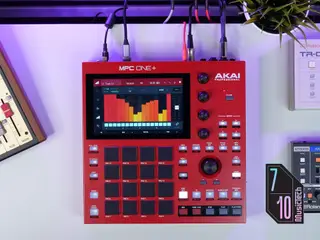
£555, akaipro.com Music would look extremely different today if not for Akai. Starting with the MPC60 in 1988, the brand’s sampler units have shaped everything from house and techno to hip-hop, becoming the go-to for names like J Dilla, Dre, and Fred Again. READ MORE: Tonverk is Elektron’s most versatile sampler yet The MPC’s legendary status is obvious — but perhaps less obvious is its place in a world of DAWs. In 2015, Akai shook up the classic MPC workflow with a 7-inch touch screen, a new focal point for its modern samplers like the MPC One+ that landed in 2023. However, two years is a long time with today’s constant bombardment of new gear. Although 2025 saw Akai release MPC3 — a complete software overhaul that bolstered the sampler range with new features and workflow improvements — it’s not obvious whether the MPC One+ still deserves a spot in a modern producer’s arsenal. So I’m here to find out: is MPC One+ still worth buying? Image: Press First impressions of the MPC One+ Unboxing the MPC One+, I’m struck by its crimson appearance. With a satisfying selection of buttons, knobs, and a large touchscreen arranged on its square chassis, just looking at the device makes me excited to turn it on. I’m generally not one for manuals, preferring to use instinct to find my way around a new piece of gear. But after half an hour of aimless and frustrated button pushing, it becomes clear that’s not going to be possible with the MPC One+. I’ve been entrenched in Ableton Live for about 15 years, and the unit’s workflow feels pretty alien. Humbled, I download the MPC One+ manual which, to Akai’s credit, includes a fantastic tutorial for first-timers, significantly demystifying the workflow. It can’t have been easy to pack so much functionality into such little space and still retain a degree of usability. Elsewhere, the signature 4×4 pad grid feels excellent to play, with colour-coded outlines that signify the type of sample on each pad, although clean freaks be warned — the rubbery texture seriously attracts dust and lint. Input and output volume knobs are hidden on the back, and they’re not the easiest to adjust without looking. However, the touch screen is crisp, vibrant, and most importantly, responsive. Despite my initial frustration, I come to the end of the tutorial both confident and optimistic. Image: Press Is Akai MPC One+ easy to use? Having crafted a simple four-track loop through the tutorial, I now have a decent handle on how to work with MPC One+. I explore the dedicated Sampler mode a bit further, which is blazingly fast. Users can pipe in external audio, say from a turntable, and chop it to the pads in mere seconds. Working up loop-based sketches is engaging and immediate — but escaping eight-bar purgatory is where the MPC One+ starts to put up a fight. Unlike a DAW, where you have a clear picture of what’s going on in your project at all times, you have to keep a lot more in your head with the MPC One+. It’s not always apparent how its operating modes relate to each other, or where things are saved. Furthermore, tasks like recording automation feel finicky and time-consuming. In a way, this forced slowing down is a positive — it makes the entire process more intentional. But it also gets in the way, and when I make music, I find the best stuff comes out when I’m working fast. Even though I don’t doubt it has the necessary features, I shudder at the thought of mixing a complex session on MPC One+. Image: Press What sounds does MPC One+ include? Included with the One+ is an impressive bank of factory sounds and presets, albeit fairly commercial in aesthetic, with plenty inspiring me as I audition samples. Drum kits, synth stabs, vocal chops — Akai has covered all bases, and for new producers, there’s a bounty of sounds for getting started. The on-board effects plugins provide ample mangling potential if you don’t like what you hear, but users can also plug in SD cards or USB sticks, and even download new samples from Splice directly on the device. What if you’re not so sample-driven? The MPC One+ also boasts many of AIR’s synth plugins like Jura, Mini D, Sub Factory, and Drumsynth. These all sound fantastic, adding serious sound design credentials to the device. Be warned, though: many involve additional purchases. One+ and Splice. Image: Press Advanced features of the MPC One+ One look at the MPC One+ PDF manual — given its 500-page heft — makes it clear Akai has thought of almost everything with this machine. I’m impressed that it supports onboard stem separation, although this costs an extra $10 to unlock. It’s also extremely slow, taking over 15 minutes to process a three-minute track into drums, bass, vocals, and ‘other’. The results are pretty heavily artefacted, which I actually like from a creative standpoint, but it’s likely quicker and more effective to use a desktop tool before loading the stems onto your memory stick. For live performance, MPC One+ is a serious contender. Although I groa
Summary of the article
Akai’s compact standalone sampler is more powerful than ever, but where does it belong in a DAW-dominated world? The post Is the Akai MPC One+ still worth buying in 2026? appeared first on MusicTech.
Read the full article for more details on EDM Dance Directory News.
Share this article:
Akai’s compact standalone sampler is more powerful than ever, but where does it belong in a DAW-dominated world? The post Is the Akai MPC One+ still worth buyin...
Written and reviewed by our team. Technology may support research, but final content is human-authored.